CliSchema
This is a documentation page for the CliSchema project and showcases some proof of concepts around static analysis of shell scripts.
Shell scripts have a notoriously high degree of dynamism and flexibility making them the number one choice for constructing pipelines of programs. It’s common place to write shell scripts that rely on external assumptions, such as programs being installed, environment variables being set or files existing in specific locations. This externalization often leads to debugging trivial errors at runtime and poor portability. In order to move such errors to compile time, the system needs to be augmented with more information about programs and their arguments. Such information can enable the system to reason about an individual program invocation statically. Take for example the following:
rm file.txt --interactive=true
While the usage of rm is widely known due to it’s prevalence, it may not be obvious that the above invocation is actually guaranteed to error at runtime, simply because “true” is actually not a valid option for the interactive option. Only valid options are: ‘never’ | ‘no’ | ‘none’ |‘once’ | ‘always’ | ‘yes’. Furthermore, with this script alone there is no guarantee that the program will succeed, as it’s unclear whether file.txt exists in this context.
However, by communicating all of the options and valid uses of rm to a static checker, we can get warnings about these things ahead of time. This introduces the concept of specifications which provide a human and machine readable way of interfacing with popular CLI programs. With a collection of specifications stored in a database, a static checker can also start to reason about entire shell scripts. In this context there are a host of different errors to be able to defend against. There’s a whole host of errors that can be checked ahead of time related to the shell interpreter such as environment variables, control flow, behaviour of builtin commands and basic file I/O.
CliSchema Language Reference
The language reference for the CliSchema.
Caution
This reference is not yet finished and neither is the underlying implementation. Some notable aspects not yet designed are program presence resolution and effect definitions as part of the schema language.
Metadata
Since each schema describes a single program, the metadata information reveals exactly which version of the program the schema references and details behind the author of the schema.
program_name
The unique name of the program used as the command name when invoking the program on the command line.
schema_version
The version of the schema itself using the semver standard.
authors
The list of authors for the schema. Specified using full names and email addresses using RFC 5322. “Full Name email@address.com”
Invocation Fundamentals
CliSchema enables invocation patterns that are mainstream and commonly used across most programs. Modern CLI tools have adopted a common structure that CliSchema exposes. There are three essential components to an invocation: Commands, Arguments and Options. The following guiding example illustrates each individually:
git push -d origin fix/typo
    │    │  │      │
    │    │  │      └─── Argument_2
    │    │  └────────── Argument_1
    │    └───────────── Option
    └────────────────── (Sub)Command
gitis the program name, but also refers to the root invocation.pushis a sub-command which groups functionality related to pushing under a single command.-dis a single option denoted with a single dash “-” that due to its presence sets the “delete” option as true.origin&fix/typotwo string arguments that specify the names of the remote destination as well as the branch.
The governing parsing pattern can be summarized as follows:
- Commands are usually single words appearing at the start of the argument list.
- Options are by default optional and can appear anywhere in the argument list and are identified with a starting single or double dash.
- Arguments are positionally dependent meaning that their order of appearance matters. Unless specified, arguments are optional by default as well.
Schema Settings
The schema settings can define a set of globally tunable rules which affect the parsing logic. For example, some programs rely on signaling with an isolated singled dash - that data either comes from stdin or goes to stdout. The following (incomplete) list of schema settings expands the parsing capabilities of the language, mostly to support conventions adopted from legacy tools.
| Setting | Description |
|---|---|
Arguments Defined Last (default: false) | Positional arguments can be interleaved between options when true positional arguments must be specified last and any interleaving turns into a validation error |
DashLess Available: (default: false) | Options must be specified with a single dash. When set to true options may omit the dash entirely, enabling style popularize by tar |
Enforce Single Dash Long Options: (default: false) | long options must be specified with a double dash. When true long options can be set using a single dash as well. |
Allow Clustering Options (default: false) | When true, boolean options can be clustered together where the last flag can also optionally take a value. For example tar -c -f backup.tar /home/user can be written as tar cf backup.tar /home/user |
Allow Adjacent Options (default: false) | When set to true the value of an options can be specified immediately after the option. For example, this would enable gcc -I./my/include |
Members
The following section dives into first class citizens of CliSchema and highlights how the organization of such members makes for intuitive argument parser logic construction.
Commands
Commands define the entry point any invocation and a logical grouping or options and arguments. They answer the question what functionality or sub-functionality is being invoked? By default, all invocations contain the root command which is just the invocation of the program. Options and arguments available to the root invocation are in “global” scope meaning they are valid options for all sub-commands unless specifically opted out. Each sub-command creates its own scope, for example git push invokes the “push” sub-command which has a separate family of options and arguments associated with it compared to the git status command.
Commands are specified using the cmd keyword
Schema Entry
Each schema is required to have exactly one command entry point named “Main” which references the program_name to use. Any effects referenced in this section refer to the canonical invocation of the program without any options or arguments. The following example shows the entry point for a program called foo.
cmd Main("foo") [] {}
Sub-Commands
The entry point or any other command definition can specify sub commands resulting in a tree like hierarchical organization of commands.
cmd Main("git") [
    subcommands GitPush & GitStatus
] {}

cmd GitPush("push") {}
cmd GitStatus("status") {}
Arguments
Arguments in an invocation provide the program with data required to carry out the core functionality of that program. They tend not to be optional as they are usually the “subject” of the program. They are identified by their position in the arguments array. For example rm foo.txt bar.txt has two arguments associated with the invocation of the rm command.
cmd Main("rm") [
    requires RemoveFiles
] {
    /// Files to be removed
    arg RemoveFiles(..) => List<Path>
}
The arguments are defined using the arg keyword and named uniquely as “RemoveFiles”. This name can be referenced by other members, like for example Main declaring that the argument is required. Furthermore, the definition for arguments takes a positional range specifier, the (..) indicates that all arguments passed will be identified as the RemoveFiles argument. The argument carries a data type List<Path>, since it is a range of strings. Both List and Path are types from the standard library of CliSchema.
Arguments can specify ranges which are non-overlapping and don’t leave any gaps. For example, the cp command requires at minimum one source file and exactly one destination directory. All arguments until the last are the source files as denoted with range specifier (..-1). And the destination is specified last using (-1).
cmd Main("cp") [
    requires Sources & Destinations
] {
    /// Source files or directories to copy
    arg Sources(..-1) => List<Path>

    /// Destination directory
    arg Destinations(-1) => Path
}
Options
Options provide configuration for a particular invocation. For example, ls -h enables the human readable option for the ls command. Options are identified by short name or long name, for example ls also has a long name for the human readable option “–human-readable”. By default, single character names will be considered shortname identifiers and matched with a single dash while multi-character names will be match with a starting double dash. There are global settings governing the parsing behaviour of options.
cmd Main("ls") {
    /// with -l and -s, print sizes in human readable form (e.g. 1K 234M 2G)
    opt HumanReadable("h", "human-readable") => Bool

    /// do not list implied entries matching shell PATTERN (overridden by -a or -A)
    opt Hide("hide") => String
}
Options are tied to a specific type providing early validation for static invocations. For example, the Bool type associated with the HumanReadable option indicates that the option can only be in a binary fashion, no additional data can be associated with it. Thus, invocation of ls -h=always does not type check against Bool the bool type.
Environment Variables
Similar to how programs rely on arguments being passed in via the command line, they might also rely on environment variables being set. For this reason environment variables are first class citizens. For example, the aws s3 ls invocation has a dependency on AWS_ACCESS_KEY_ID and AWS_SECRET_ACCESS_KEY.
cmd Main("aws") [
    subcommands S3
] {
    // ...
}

cmd S3("s3") [
    subcommands List
] {
     // ...
}

cmd List("ls") {
    env AccessKeyID("AWS_ACCESS_KEY_ID") => String
    env AccessKeySecret("AWS_SECRET_ACCESS_KEY") => String
}
Types
Types play a central role of representing data in CliSchema. They make it possible to constrain the space of possible inputs across all other entities. They are also fully reusable across members of the schema. Types can be referenced directly for Options, Arguments and Environment Variables.
Primitive Types
| Name | Data Representation |
|---|---|
Bool | Single bit boolean |
Int64 | 64 bit signed integer |
Float64 | 64 bit float |
String | Heap-allocated string buffer |
Path | Heap allocated string with path format validation |
Collections
| Name | Data Representation |
|---|---|
List<T> | Heap allocated resizeable vector of type T |
T | T | T ... | Arbitrary large enumeration of type T allocated on the heap |
Refinements
Types can have arbitrary refinement functions attached to them for compile time validation. The most basic kind of refinement can be applied to enums to specify a default value when no value is passed to the option.
type WhenSpecifier => "always" | "auto" | "never"

cmd Main("ls") {
    /// color the output WHEN
    opt Color("color") => WhenSpecifier [
        @default("always")
    ]
}
As another example, refinements can be used to narrow the range of numeric values:
cmd Main("foo") {
    opt PrivilegedPort("p", "port") => Int64 [
        @min(1)
        @max(1024)
    ]
}
The following list of refinements could be added to provide better out of the box support for type level validation.
Email(RFC 5322)Domain(RFC 1035)Url(RFC 3986)IPv4(RFC 791)IPv6(RFC 8200)MacAddress(IEEE 802)Port(constrained u16: 1-65535)Cidr(RFC 4632)Date(ISO 8601)DateTime(ISO 8601/RFC 3339)Duration(ISO 8601)Time(time without date)Timezone(IANA timezone)Uuid(RFC 4122)Base64(RFC 4648)Semver(semver.org)MimeType(RFC 2046)Currency(ISO 4217)CountryCode(ISO 3166)LanguageTag(BCP 47)Isbn(ISBN-10/13)Issn(ISSN)Jwt(RFC 7519)GitHash(SHA-1/SHA-256)Json(RFC 8259)Yaml(RFC 9512)RegexDockerTagPackageVersionTomlCsv
Dependent Types
Warning
This feature is actively being considered. While dependent types are a powerful concept, they risk needlessly complicating the interface surface.
Effects
Invocations of programs can either deposit side-effects onto the host or require certain effects to have been present before invocation of the program. Effects can be tagged to members and signal that when an invocation includes that member the effect requirement or deposition will be true. For example, the rm command requires that all files passed as arguments are present before the execution of the program (precondition) and upon successful execution, removes those files ensuring that they don’t exist (postcondition). In this case, every argument has a precondition of FileExists and a post condition of FileNotExists.
cmd Main("rm") [
    requires RemoveFiles
] {
    /// files to be removed
    arg RemoveFiles(..) => List<Path> [
        requires FileExists
        ensures FileNotExists
    ]
}
An effect such as FileExists is tied to a specific type. In this case it can only be associated with List<Path> or Path. Furthermore, effects can have inverses of one another where FileExists is the negative to FileNotExists and vice versa. Effects play a key role in systems that consume CliSchema in order to reason statically about effects on the Host-OS.
| Effect Name | Associated Type |
|---|---|
FileExists | Path |
FileNotExists | Path |
FileReadable | Path |
FileNotReadable | Path |
FileWriteable | Path |
FileNotWriteable | Path |
FileExecutable | Path |
FileNotExecutable | Path |
DirExists | Path |
DirNotExists | Path |
DirReadable | Path |
DirNotReadable | Path |
DirWriteable | Path |
DirNotWriteable | Path |
EnvVarSet | String |
EnvVarUnSet | String |
Dependencies and Exclusions
Often times programs might have options that conflict or depend on one another. In the case of conflicts, some Unix/Posix conventions simply use the options that have been specified last. For example git log --one-line --format="%H" will display using the specified format and ignore single line option. If such silent ignores are not desired, explicit exclusions can be put in place to error on validation checking.
cmd Main("git") [
    subcommands Log
]

cmd Log("log") {
    opt SingleLine("one-line") => Bool [
        excludes Format
    ]

    opt Format("format") => String
}
Cancellations
Warning
This feature has not yet been fully designed. Effects should have the option of canceling out other effects.
Scopes
Members are visible based on the scope of the command that they are tied to.
Schemas
cat
/// Concatenate FILE(s) to standard output.
cmd Main("cat") {
    /// With no FILE, or when FILE is -, read standard input.
    arg FileToDisplay(..) => List<Path> [
        requires FileExists
    ]

    /// equivalent to -vET
    opt ShowAll("A", "show-all") => Bool

    /// number nonempty output lines, overrides -n
    opt NumberNonBlank("b", "number-nonblank") => Bool

    /// equivalent to -vE
    opt NonPrintingEnds("e") => Bool

    /// display $ at end of each line
    opt ShowEnds("E", "show-ends") => Bool

    /// number all output lines
    opt Number("n", "number") => Bool

    /// suppress repeated empty output lines
    opt SqueezeBlank("s", "squeeze-blank") => Bool

    /// equivalent to -vT
    opt NonPrintingAndTabs("t") => Bool

    /// display TAB characters as ^I
    opt ShowTabs("T", "show-tabs") => Bool

    /// (ignored)
    opt Ignored("u") => Bool

    /// use ^ and M- notation, except for LFD and TAB
    opt ShowNonPrinting("v", "show-nonprinting") => Bool

    /// display this help and exit
    opt Help("help") => Bool [
        excludes All
    ]

    /// output version information and exit
    opt Version("version") => Bool [
        excludes All
    ]
}
cp
cmd Main("cp") [
    requires Sources
    requires Dest | TargetDirectory
] {
    /// source files or directories to copy
    arg Sources(0..-1) => List<Path> [
        requires FileExists | DirExists
    ]

    /// destination file or directory (the last positional argument,
    /// omitted when -t is used)
    arg Dest(-1) => Path [
        ensures FileExists
        excludes TargetDirectory
    ]


    /// treat DEST as a normal file, never as a directory; only valid
    /// when exactly one source is given
    opt NoTargetDirectory("T", "no-target-directory") => Bool [
        excludes TargetDirectory
    ]

    /// copy all SOURCE arguments into DIRECTORY instead of using the
    /// last positional as the destination
    opt TargetDirectory("t", "target-directory") => Path [
        requires DirExists
        excludes NoTargetDirectory
    ]

    /// copy directories (and their contents) recursively
    opt Recursive("r", "R", "recursive") => Bool

    /// archive mode: preserve all attributes and copy recursively
    /// (equivalent to -dR --preserve=all)
    opt Archive("a", "archive") => Bool

    /// hard link files instead of copying them
    opt Link("l", "link") => Bool [
        excludes SymbolicLink
    ]

    /// make symbolic links instead of copying
    opt SymbolicLink("s", "symbolic-link") => Bool [
        excludes Link
    ]

    /// copy only when SOURCE is newer than DEST, or DEST is missing;
    /// UPDATE controls which files are replaced
    opt Update("update") => "all" | "none" | "none-fail" | "older" [
        @default("older")
    ]

    /// equivalent to --update=older
    opt UpdateOlder("u") => Bool

    /// (deprecated) silently skip existing destination files;
    /// prefer --update=none instead
    opt NoClobber("n", "no-clobber") => Bool

    /// only copy file attributes, not file data
    opt AttributesOnly("attributes-only") => Bool

    /// copy contents of special files (e.g. device nodes) when recursive
    opt CopyContents("copy-contents") => Bool [
        requires Recursive
    ]

    /// use full source file name (rooted path) under the target DIRECTORY,
    /// creating intermediate directories as needed
    opt Parents("parents") => Bool [
        requires TargetDirectory | Dest
    ]

    /// remove trailing slashes from each SOURCE argument before processing
    opt StripTrailingSlashes("strip-trailing-slashes") => Bool


    /// follow symbolic links listed on the command line in SOURCE
    /// (command-line symlinks only; others are not followed)
    opt FollowCliLinks("H") => Bool [
        excludes Dereference
        excludes NoDereference
    ]

    /// always follow symbolic links in SOURCE (dereference all)
    opt Dereference("L", "dereference") => Bool [
        excludes NoDereference
        excludes FollowCliLinks
    ]

    /// never follow symbolic links in SOURCE; copy the symlink itself
    opt NoDereference("P", "no-dereference") => Bool [
        excludes Dereference
        excludes FollowCliLinks
    ]

    /// follow existing symlinks to directories at the destination
    opt KeepDirectorySymlink("keep-directory-symlink") => Bool


    type FileAttributes => "mode" | "ownership" | "timestamps" | "links" | "context" | "xattr" | "all"

    /// preserve the specified file attributes (default: mode, ownership,
    /// timestamps); additional attrs: links, context, xattr, all
    opt Preserve("preserve") => List<FileAttributes> [
        @default(["mode", "ownership", "timestamps"])
    ]

    /// shorthand for --preserve=mode,ownership,timestamps
    opt PreserveBasic("p") => Bool

    /// do not preserve the specified attributes
    opt NoPreserve("no-preserve") => List<FileAttributes>

    type BackupKind => "none" | "off" | "numbered" | "t" | "existing" | "nil" | "simple" | "never"

    /// make a backup of each existing destination file; CONTROL selects
    /// the versioning scheme
    opt Backup("backup") => BackupKind [
        @default("existing")
    ]

    /// like --backup but always uses the simple scheme and takes no argument
    opt BackupSimple("b") => Bool

    /// override the default backup suffix (~)
    opt Suffix("S", "suffix") => String

    type BehaviourKind => "auto" | "always" | "never"

    /// control copy-on-write / clone behaviour
    opt Reflink("reflink") => BehaviourKind [
        @default("auto")
    ]

    /// control creation of sparse files in the destination
    opt Sparse("sparse") => BehaviourKind [
        @default("auto")
    ]

    /// do not cross filesystem boundaries (stay on the same device)
    opt OneFileSystem("x", "one-file-system") => Bool

    /// remove each existing destination file before opening it
    /// (contrast with --force, which removes only when open fails)
    opt RemoveDestination("remove-destination") => Bool [
        excludes Force
    ]


    /// if an existing destination file cannot be opened, remove it
    /// and try again (ignored when -n is also used)
    opt Force("f", "force") => Bool [
        excludes RemoveDestination
    ]

    /// prompt before every overwrite
    opt Interactive("i", "interactive") => Bool [
        excludes NoClobber
    ]

    /// set the SELinux security context of the destination to the default type
    opt SelinuxDefault("Z") => Bool [
        excludes Context
    ]

    /// set the SELinux or SMACK security context of the destination;
    /// without CTX, behaves like -Z
    opt Context("context") => String [
        excludes SelinuxDefault
    ]

    /// explain what is being done
    opt Verbose("v", "verbose") => Bool

    /// explain how each file is copied (implies -v)
    opt Debug("debug") => Bool


    /// display help and exit
    opt Help("help") => Bool [
        excludes All
    ]

    /// output version information and exit
    opt Version("version") => Bool [
        excludes All
    ]
}
echo
cmd Main("echo") [
] {
    /// strings to be written to standard output
    arg PrintText(..) => List<String>

    /// do not output the trailing newline
    opt NoNewline("n") => Bool

    /// enable interpretation of backslash escapes
    opt EnableEscapes("e") => Bool

    /// disable interpretation of backslash escapes (default)
    opt DisableEscapes("E") => Bool
}
head
cmd Main("head") [
    requires InputFiles
] {

    // Print the first 10 lines of each FILE to standard output.  With more than one FILE,
    // precede each with a header giving the file name.
    arg InputFiles(..) => List<File> [
        requires FileExists
        ensures StdOut
    ]

    // NUM  may  have  a  multiplier  suffix:  b  512, kB 1000, K 1024, MB 1000*1000, M 1024*1024,
    // GB 1000*1000*1000, G 1024*1024*1024, and so on for T, P, E, Z, Y, R, Q.  Binary prefixes
    // can be used, too: KiB=K, MiB=M, and so on.
    type SuffixKind =>  "b" | "kB" | "K" | "MB" | "M" | "GB" | "G" | "T" | "P" | "E" | "Z" | "Y" | "R" | "Q"

    // print the first NUM bytes of each file; with the leading '-', print all but the last NUM
    // bytes  of  each file
    opt Bytes("c", "bytes") => String

    // print the first NUM lines instead of the first 10; with the leading '-', print all but the last NUM lines
    // of each file
    opt Lines("n", "lines") => String

    // never print headers giving file names
    opt Quiet("q", "quiet", "silent") => Bool

    // always print headers giving file names
    opt Verbose("v", "verbose") => Bool

    // line delimiter is NUL, not newline
    opt Verbose("z", "zero-terminated") => Bool

    // display this help and exit
    opt Verbose("help") => Bool

    // output version information and exit
    opt Verbose("version") => Bool
}
ls
cmd Main("ls") {
    /// files or directories to list (defaults to current directory)
    arg Files(..) => List<Path> [
        @default(".")
    ]

    /// do not ignore entries starting with .
    opt All("a", "all") => Bool

    /// do not list implied . and ..
    opt AlmostAll("A", "almost-all") => Bool

    /// with -l, print the author of each file
    opt Author("author") => Bool

    /// print C-style escapes for nongraphic characters
    opt Escape("b", "escape") => Bool

    /// with -l, scale sizes by SIZE when printing them (e.g. '--block-size=M')
    opt BlockSize("block-size") => String

    /// do not list implied entries ending with ~
    opt IgnoreBackups("B", "ignore-backups") => Bool

    /// with -lt: sort by, and show, ctime; with -l: show ctime and sort by name;
    /// otherwise: sort by ctime, newest first
    opt Ctime("c") => Bool

    /// list entries by columns
    opt Columns("C") => Bool

    type WhenSpecifier => "always" | "auto" | "never"

    /// color the output WHEN
    opt Color("color") => WhenSpecifier [
        @default("always")
    ]

    /// list directories themselves, not their contents
    opt Directory("d", "directory") => Bool

    /// generate output designed for Emacs' dired mode
    opt Dired("D", "dired") => Bool

    /// list all entries in directory order (do not sort)
    opt UnsortedAll("f") => Bool

    /// append indicator (one of */=>@|) to entries WHEN
    opt Classify("F", "classify") => WhenSpecifier [
        @default("always")
    ]

    /// append indicator to entries, except do not append '*'
    opt FileType("file-type") => Bool

    /// across -x, commas -m, horizontal -x, long -l, single-column -1, verbose -l, vertical -C
    opt Format("format") => "across" | "commas" | "horizontal" | "long" | "single-column" | "verbose" | "vertical"

    /// like -l --time-style=full-iso
    opt FullTime("full-time") => Bool

    /// like -l, but do not list owner
    opt NoOwner("g") => Bool

    /// group directories before files
    opt GroupDirectoriesFirst("group-directories-first") => Bool

    /// in a long listing, do not print group names
    opt NoGroup("G", "no-group") => Bool

    /// with -l and -s, print sizes in human readable form (e.g. 1K 234M 2G)
    opt HumanReadable("h", "human-readable") => Bool

    /// do not list implied entries matching shell PATTERN (overridden by -a or -A)
    opt Hide("hide") => String

    /// likewise, but use powers of 1000 not 1024
    opt Si("si") => Bool

    /// follow symbolic links listed on the command line
    opt DereferenceCommandLine("H", "dereference-command-line") => Bool

    /// follow each command line symbolic link that points to a directory
    opt DereferenceCommandLineSymlinkToDir("dereference-command-line-symlink-to-dir") => Bool


    /// hyperlink file names WHEN
    opt Hyperlink("hyperlink") => WhenSpecifier [
        @default("always")
    ]

    /// append indicator with style WORD to entry names
    opt IndicatorStyle("indicator-style") => "none" | "slash" | "file-type" | "classify" [
        @default("none")
    ]

    /// print the index number of each file
    opt Inode("i", "inode") => Bool

    /// do not list implied entries matching shell PATTERN
    opt Ignore("I", "ignore") => String

    /// default to 1024-byte blocks for disk usage; used only with -s
    opt Kibibytes("k", "kibibytes") => Bool

    /// use a long listing format
    opt Long("l") => Bool

    /// when showing file info for a symbolic link, show info for the file
    /// the link references rather than for the link itself
    opt Dereference("L", "dereference") => Bool

    /// fill width with a comma separated list of entries
    opt CommaSeparated("m") => Bool

    /// like -l, but list numeric user and group IDs
    opt NumericUidGid("n", "numeric-uid-gid") => Bool

    /// print entry names without quoting
    opt Literal("N", "literal") => Bool

    /// like -l, but do not list group information
    opt NoGroupInfo("o") => Bool

    /// append / indicator to directories
    opt IndicatorSlash("p") => Bool

    /// print ? instead of nongraphic characters
    opt HideControlChars("q", "hide-control-chars") => Bool

    /// show nongraphic characters as-is
    opt ShowControlChars("show-control-chars") => Bool

    /// enclose entry names in double quotes
    opt QuoteName("Q", "quote-name") => Bool

    /// use quoting style WORD for entry names
    opt QuotingStyle("quoting-style") => "literal" | "locale" | "shell" | "shell-always" | "shell-escape" | "shell-escape-always" | "c" | "escape"

    /// reverse order while sorting
    opt Reverse("r", "reverse") => Bool

    /// list subdirectories recursively
    opt Recursive("R", "recursive") => Bool

    /// print the allocated size of each file, in blocks
    opt Size("s", "size") => Bool

    /// sort by file size, largest first
    opt SortBySize("S") => Bool

    /// sort by WORD instead of name: none, size, time, version, extension, width
    opt Sort("sort") => "none" | "size" | "time" | "version" | "extension" | "width"

    /// select which timestamp to display or sort by
    opt Time("time") => "atime" | "access" | "use" | "ctime" | "status" | "mtime" | "modification" | "birth" | "creation"

    /// time/date format with -l
    opt TimeStyle("time-style") => String

    /// sort by time, newest first
    opt SortByTime("t") => Bool

    /// assume tab stops at each COLS instead of 8
    opt Tabsize("T", "tabsize") => UInt

    /// with -lt: sort by, and show, access time; with -l: show access time
    /// and sort by name; otherwise: sort by access time, newest first
    opt AccessTime("u") => Bool

    /// do not sort; list entries in directory order
    opt NoSort("U") => Bool

    /// natural sort of (version) numbers within text
    opt VersionSort("v") => Bool

    /// set output width to COLS; 0 means no limit
    opt Width("w", "width") => UInt

    /// list entries by lines instead of by columns
    opt ListByLines("x") => Bool

    /// sort alphabetically by entry extension
    opt SortByExtension("X") => Bool

    /// print any security context of each file
    opt Context("Z", "context") => Bool

    /// end each output line with NUL, not newline
    opt Zero("zero") => Bool

    /// list one file per line
    opt OnePerLine("1") => Bool

    /// display this help and exit
    opt Help("help") => Bool [
        excludes All
    ]

    /// output version information and exit
    opt Version("version") => Bool [
        excludes All
    ]
}
mkdir
cmd Main("mkdir") [
    requires CreateDirectories
] {
    /// directories to be created
    arg CreateDirectories(..) => List<Path> [
        requires DirNotExists
        ensures DirExists
    ]

    /// set file mode (as in chmod), not a=rwx - umask
    opt Mode("m", "mode") => String

    /// no error if existing, make parent directories as needed
    opt Parents("p", "parents") => Bool

    /// print a message for each created directory
    opt Verbose("v", "verbose") => Bool

    /// set the SELinux security context of each created directory to CTX
    opt Context("Z", "context") => String

    /// display this help and exit
    opt Help("help") => Bool [
        excludes All
    ]

    /// output version information and exit
    opt Version("version") => Bool [
        excludes All
    ]
}
printf
cmd Main("printf") [
    requires Format
] {
    /// the format string controlling output, as in C printf; may contain
    /// literal characters, escape sequences (e.g. \n, \t, \uHHHH), and
    /// format specifiers (e.g. %s, %d, %f); the format is reused as
    /// necessary to consume all arguments
    arg Format(0) => String

    /// zero or more values substituted into FORMAT in order, according to
    /// their corresponding format specifiers; if arguments exceed
    /// specifiers, FORMAT is reused from the beginning; if fewer are
    /// supplied, missing numeric specifiers default to 0 and string
    /// specifiers to the empty string
    arg Arguments(1..) => List<String>

    /// assign the output to shell variable VAR rather than printing to
    /// standard output (bash builtin only)
    opt Var("v") => String

    /// display help and exit
    opt Help("help") => Bool [
        excludes All
    ]

    /// output version information and exit
    opt Version("version") => Bool [
        excludes All
    ]
}
rm
cmd Main("rm") [
    requires RemoveFiles
] {
    /// files to be removed
    arg RemoveFiles(..) => List<Path> [
    	requires FileExists
        ensures FileNotExists
    ]

    /// ignore nonexistent files and arguments, never prompt
    opt Force("f", "force") => Bool [
        relaxes FileExists
    ]

    /// prompt before every removal
    opt PromptEveryTime("i") => Bool

    /// prompt once before removing more than three files, or when
    /// removing recursively; less intrusive than -i, while still
    /// giving protection against most mistakes
    opt PromptOnce("I") => Bool

    /// prompt according to WHEN: never, once (-I), or always (-i);
    /// without WHEN, prompt always
    opt Interactive("interactive") => "never" | "no" | "none" | "once" | "always" | "yes" [
    	@default("never")
    ]

    /// when removing a hierarchy recursively, skip any directory
    /// that is on a file system different from that of the
    /// corresponding command line argument
    opt OneFs("one-file-system") => Bool

    /// do not remove '/' (default); with 'all', reject any command
    /// line argument on a separate device from its parent
    opt NoPreserveRoot("preserve-root") => String [
    	@default("all")
    ]

    /// remove directories and their contents recursively
    opt Recursive("r", "R", "recursive") => Bool

    /// remove empty directories
    opt Dir("d", "dir") => Bool

    /// explain what is being done
    opt Verbose("v", "verbose") => Bool

    /// show help menu
    opt Help("help") => Bool [
        excludes All
    ]

    /// output version information and exit
    opt Version("version") => Bool [
    	excludes All
    ]
}
touch
cmd Main("touch") [
    requires Files
] {
    /// files whose timestamps should be updated, or created if they do not exist
    arg Files(..) => List<Path> [
        ensures FileExists
    ]

    /// change only the access time; if absent, both access and modification
    /// times are updated
    opt AccessOnly("a") => Bool [
        excludes ModifyOnly
    ]

    /// do not create any files; silently ignore each argument that does not
    /// already exist
    opt NoCreate("c", "no-create") => Bool

    /// parse STRING as a date/time description and use it instead of the
    /// current time (e.g. "2 hours ago", "next Monday", "2024-06-01 12:00")
    opt Date("d", "date") => String [
        excludes Reference & Stamp
    ]

    /// affect each symbolic link itself rather than the file the link
    /// refers to; only on systems that support lchown(2)
    opt NoDereference("h", "no-dereference") => Bool

    /// change only the modification time
    opt ModifyOnly("m") => Bool [
        excludes AccessOnly
    ]

    /// use the timestamps of FILE instead of the current time; FILE must
    /// already exist
    opt Reference("r", "reference") => Path [
        requires FileExists
        excludes Date & Stamp
    ]

    /// use the time STAMP instead of the current time, where STAMP is
    /// formatted as [[CC]YY]MMDDhhmm[.ss]
    /// TODO add a refinement type: @pattern("^(\\d{2})?(\\d{2})?\\d{4}\\d{4}(\\.\\d{2})?$")
    opt Stamp("t") => String [
        excludes Date & Reference
    ]

    /// explicitly select which timestamp to update: "access", "atime", and
    /// "use" are equivalent to -a; "modify" and "mtime" are equivalent to -m
    opt Time("time") => "access" | "atime" | "use" | "modify" | "mtime"

    /// display help and exit
    opt Help("help") => Bool [
        excludes All
    ]

    /// output version information and exit
    opt Version("version") => Bool [
        excludes All
    ]
}
Examples
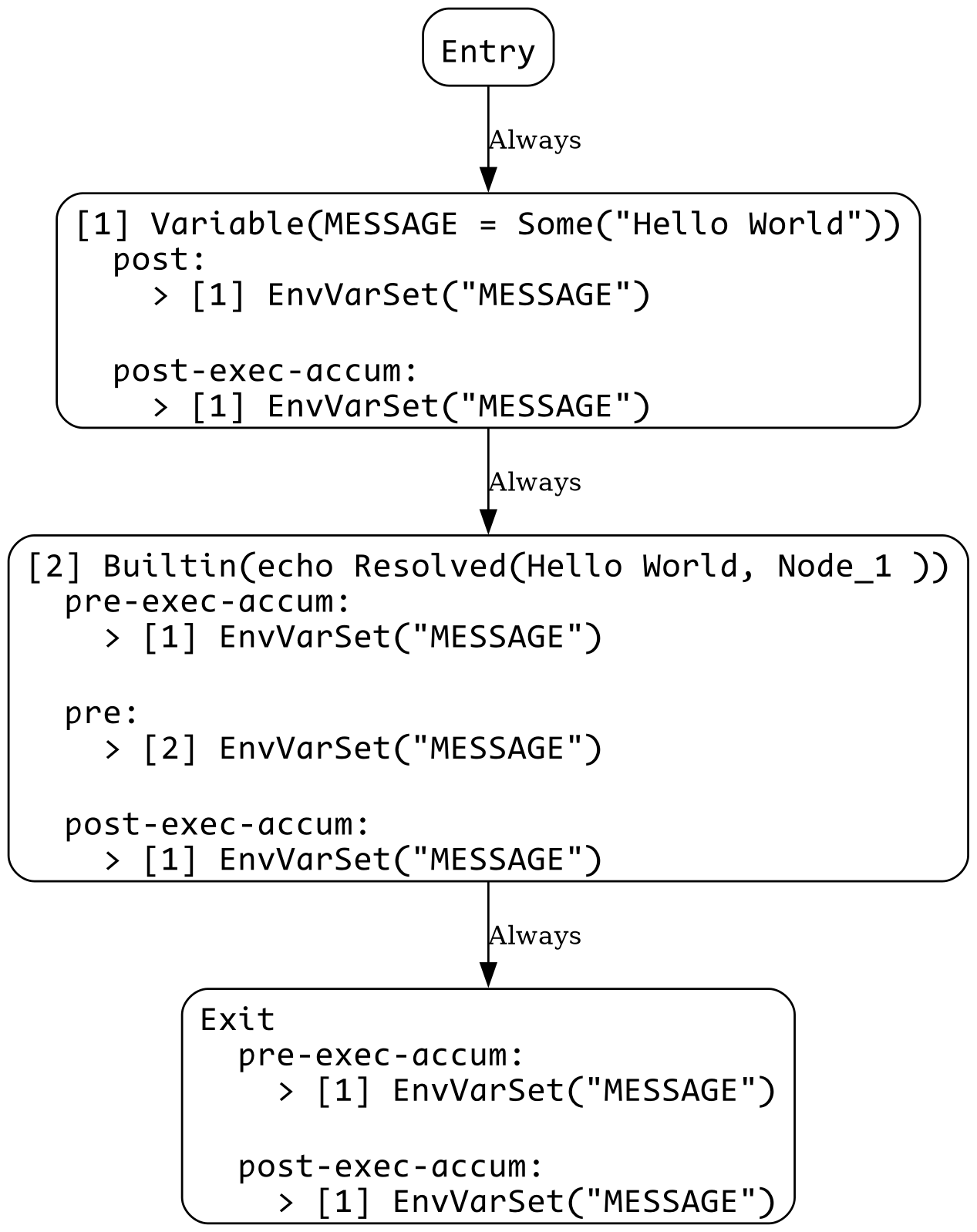
1_var_use.sh
MESSAGE="Hello World"

echo $MESSAGE
View CFG
1_var_use_err.sh
echo $MESSAGE
Error:
  × Unmet Precondition
   ╭─[./shell_scripts/1_var_use_err.sh:1:7]
 1 │ echo $MESSAGE
   ·       ───┬───
   ·          ╰── Precondition EnvVarSet("MESSAGE") could not be met
   ╰────
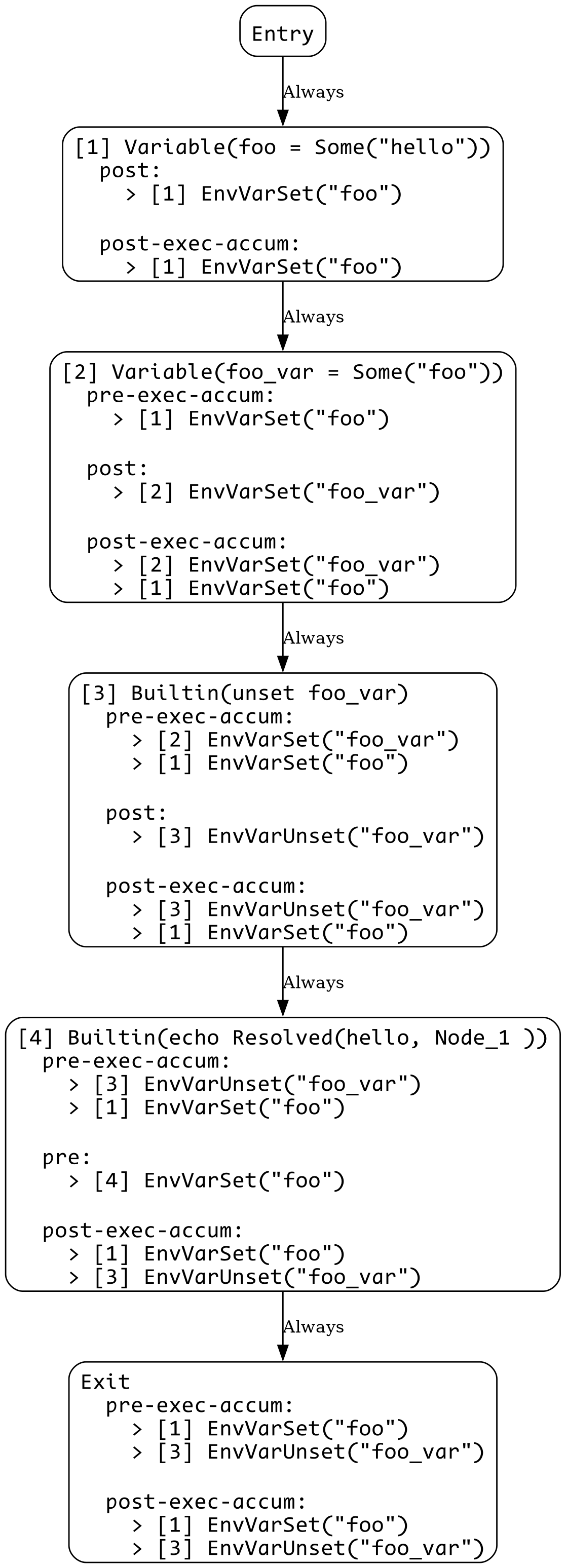
2_var_unset.sh
foo=hello
foo_var=foo

unset foo_var

echo $foo
View CFG
2_var_unset_err.sh
foo=hello
foo_var=foo

unset $foo_var

echo $foo
Error:
  × Unmet Precondition
   ╭─[./shell_scripts/2_var_unset_err.sh:6:7]
 5 │
 6 │ echo $foo
   ·       ─┬─
   ·        ╰── Precondition EnvVarSet("foo") could not be met
   ╰────
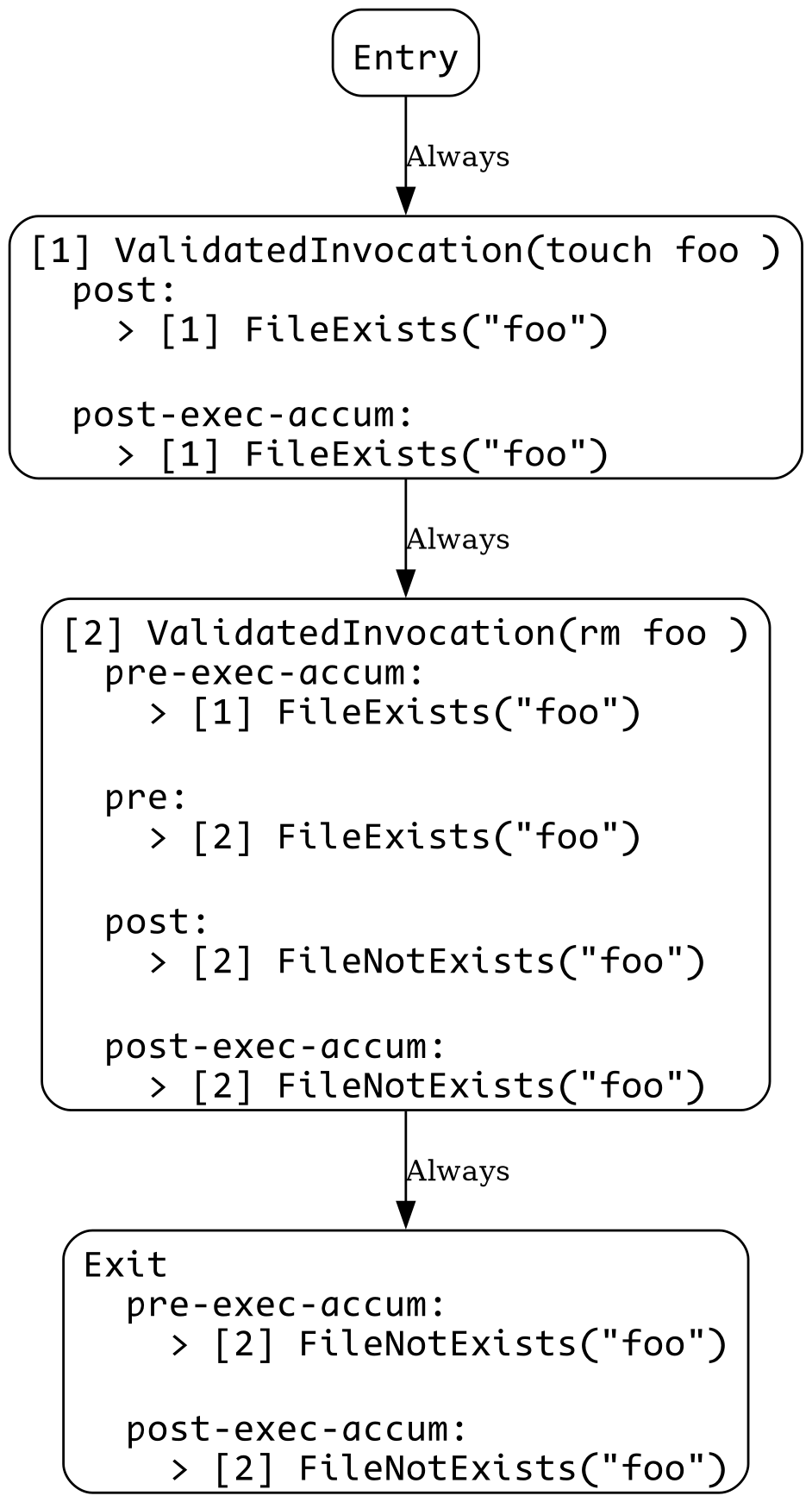
3_file_exists.sh
touch foo
rm foo
View CFG
3_file_exists_err.sh
touch foo

rm foo bar
Error:
  × Unmet Precondition
   ╭─[./shell_scripts/3_file_exists_err.sh:3:8]
 2 │
 3 │ rm foo bar
   ·        ─┬─
   ·         ╰── Precondition FileExists("bar") could not be met
   ╰────
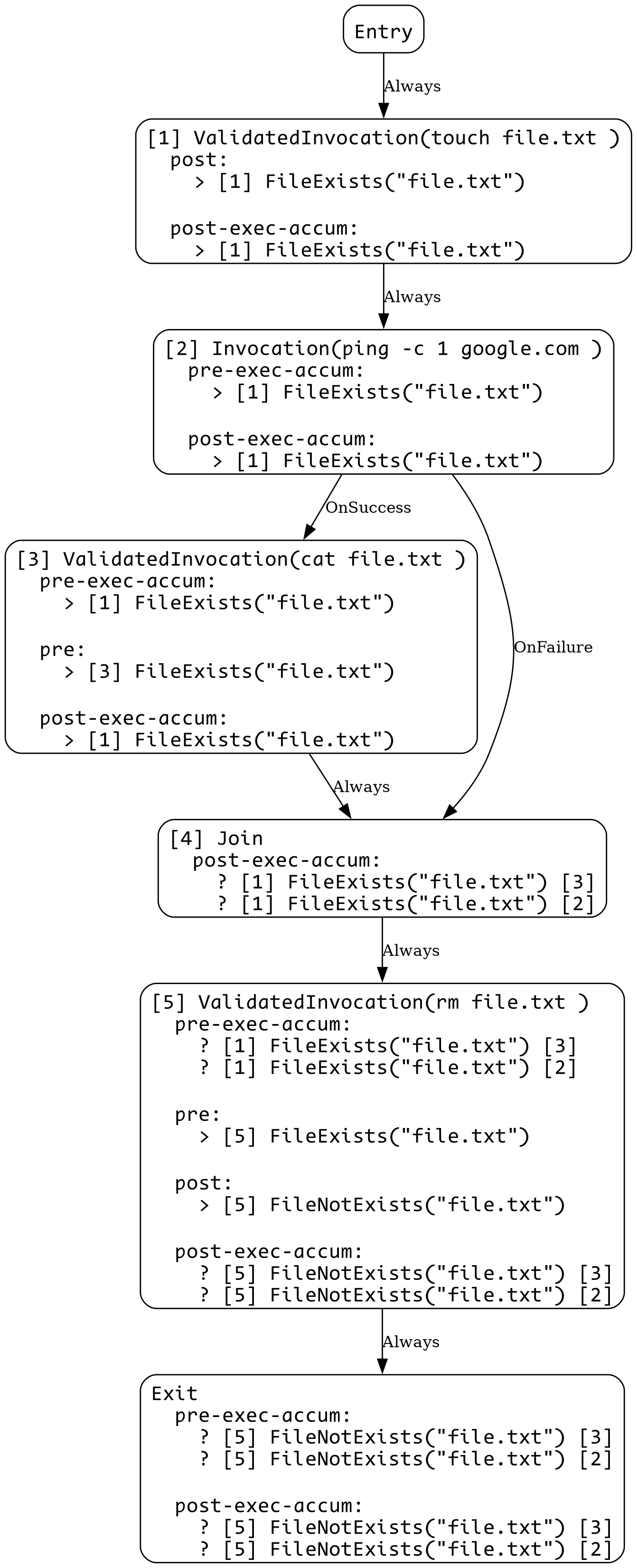
4_control_flow.sh
touch file.txt

if ping -c 1 google.com; then
    cat file.txt
fi

rm file.txt
View CFG
4_control_flow_err.sh
touch file.txt

if ping -c 1 google.com; then
    rm file.txt
fi

cat file.txt
Error:
  × Potentially Unmet Precondition
   ╭─[./shell_scripts/4_control_flow_err.sh:7:5]
 6 │
 7 │ cat file.txt
   ·     ────┬───
   ·         ╰── FileExists("file.txt") not satisfied due to: Some("rm file.txt")
   ╰────